LCD Display Screen
The LCD display screen is situated on the front of the Lynks, this is where you can control and operate the system.
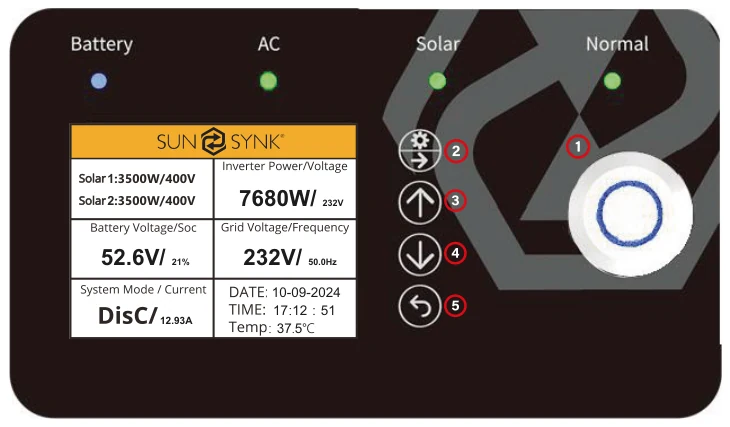
- Power - to turn the system on / off.
- Settings / Select - to operate the settings menu & to select.
- Up - to navigate up.
- Down - to navigate down.
- Home / Back - to go back to the home menu & to navigate backwards.
| TYPE | INDICATION | DESCRIPTION |
|---|---|---|
| BATTERY | GREEN | CHARGING |
| BLUE | DISCHARGING | |
| AC | GREEN | AC CONNECTED |
| OFF | AC OFF | |
| SOLAR | GREEN | SOLAR ON |
| OFF | SOLAR OFF | |
| NORMAL | GREEN | INVERTER RUNNING |
| RED | SYSTEM FAULT | |
| OFF | INVERTER NOT RUNNING |